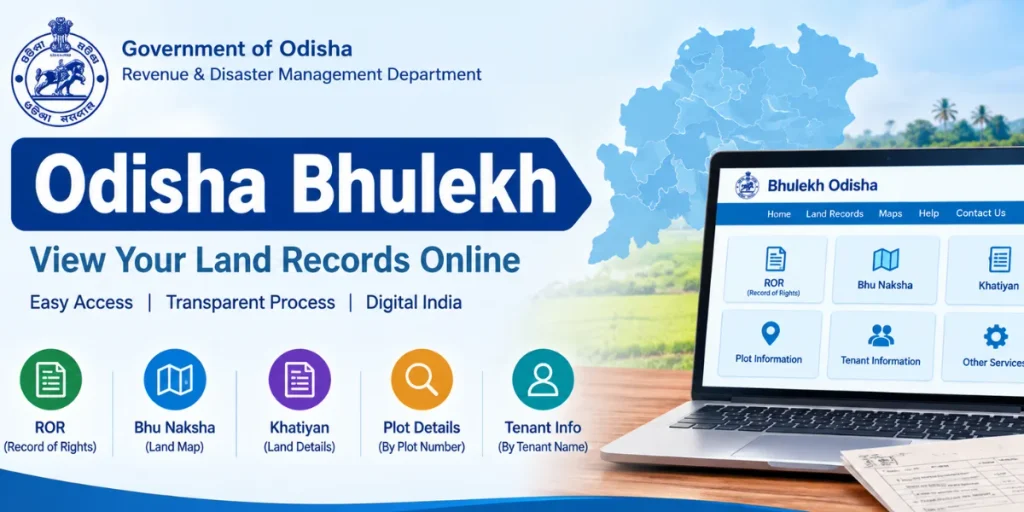
Bhulekh Odisha is the official land records portal launched by the Government of Odisha to provide convenient online access to land-related information. Through this portal, users can explore Bhunaksha Odisha, ROR Odisha (Record of Rights), and other important land records.
The official Bhulekh Odisha portal is available at bhulekh.ori.nic.in. It enables users to check landowner details, plot numbers, property information, Record of Rights (ROR), and land maps online. These digital services help people access essential land records without making unnecessary visits to government offices.
In this guide, you will learn how to use the Odisha Bhulekh portal, search land records online, obtain certified copies of the Record of Rights, understand Bhunaksha Odisha, and apply for land diversion. Read on to explore the portal’s key features and learn how to access the available services step by step.
Key Facts About Bhulekh Odisha
Users can search for land records on the Bhulekh Odisha portal using details such as the landowner’s name (tenant name), plot number, or Khatiyan number. The portal also provides access to several other land-related services. Here are the key facts about Bhulekh Odisha that you should know before using the portal.
| Particulars | Details |
|---|---|
| Portal Name | Bhulekh Odisha |
| Launched By | Government of Odisha |
| Department | Revenue and Disaster Management Department, Odisha |
| Official Website | https://bhulekh.ori.nic.in |
| Main Purpose | Online access to land records |
| Available Records | Record of Rights (ROR), plot details, Khatiyan information |
| Search Options | District, Tahasil, village, Khatiyan number, plot number, tenant name |
| Land Map Service | Bhunaksha Odisha |
| Main Beneficiaries | Landowners, farmers, buyers, and other citizens |
| Online Services | Land record search and access to available ROR information |
| Main Benefit | Convenient access to land-related information online |
Services Available on the Bhulekh Odisha Portal
The Bhulekh Odisha portal is designed to make land records and related revenue information accessible to citizens in a digital format. It helps users find important property details and access links to various land and revenue services online.
The major services available through the portal include:
- Record of Rights (RoR): Access land ownership and related record information.
- Map View: View available land maps and plot-related details.
- Tahasil Information: Find information related to Tahasils and revenue administration.
- State Statistics: Access available land records and related statistical information.
- Online Stamp Duty Payment: Access the relevant online service for stamp duty payments.
- Online Land Revenue Payment: Find the online facility for paying applicable land revenue.
- Revenue Court Access: Access the relevant online revenue court services for land-related matters.
View Bhulekh Odisha Land Records Online
Citizens can check Odisha Land Records and access available Record of Rights (RoR) details online through the official Bhulekh Odisha portal. Follow the steps below to search for your land records.
Step 1: Visit the official Bhulekh Odisha website at bhulekh.ori.nic.in.
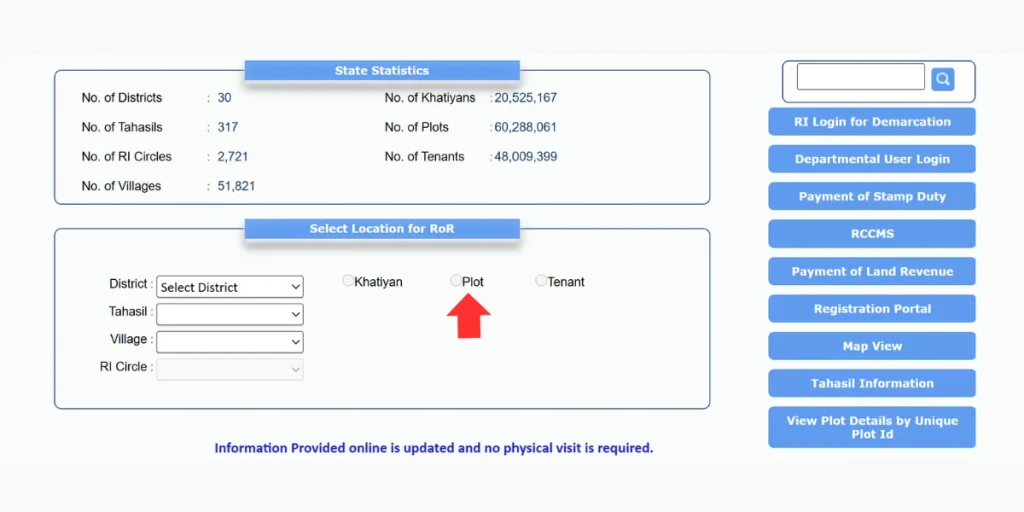
Step 2: On the homepage, locate the “Select Location for RoR” section.
Step 3: Select the required location details, such as your district, Tahasil, village, and other available options.
Step 4: Choose your preferred search method to find the land records. You can generally search using one of the following details:
- Khatiyan Number: Enter the relevant Khatiyan number.
- Plot Number: Provide the plot number associated with the land.
- Tenant Name: Search using the recorded landholder’s name.
Step 5: Enter the required information and click the relevant button to view the available land record details.
Step 6: Review the displayed RoR information and check the available options to view or print the record, if needed.
Note: Keep your land details ready before starting the search. The information displayed online should be verified with the relevant revenue office when an officially certified land record is required.
Odisha Land Records by Khatiyan Number, Plot Number, or Tenant Name
The Bhulekh Odisha portal allows users to search for land records using a Khatiyan number, plot number, or tenant name. Follow the steps below to access the available Record of Rights (RoR) details online.
Step 1: Visit the official Odisha Bhulekh website and select your preferred search option: Khatiyan Number, Plot Number, or Tenant Name. Then choose the required location details, including the district, Tahasil, village, and RI Circle, wherever prompted.
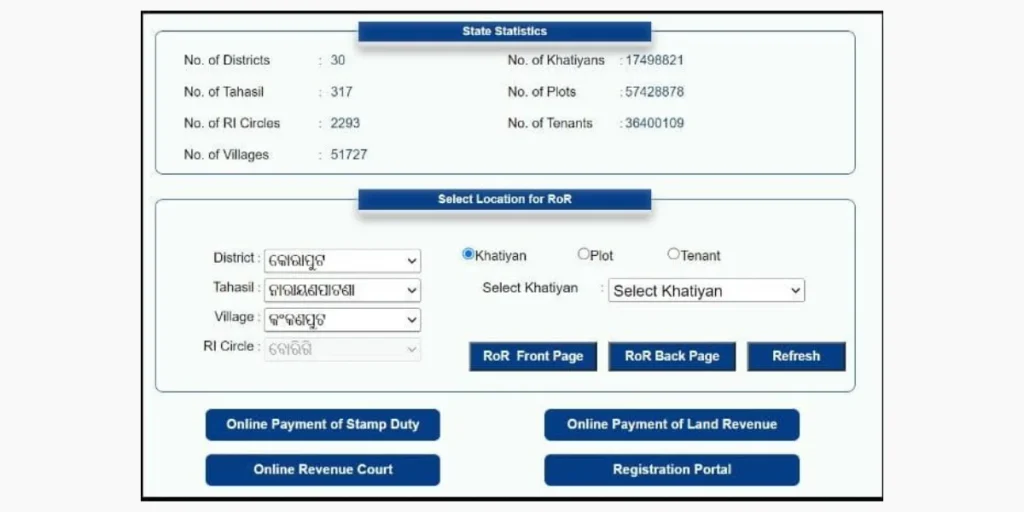
Step 2: Enter or select the relevant land information according to your chosen search method. Make sure the details are correct before proceeding.
Step 3: After the matching land record appears, select ROR Front Page or ROR Back Page, depending on which part of the document you want to view.
Step 4: The corresponding Record of Rights document will appear on the screen. The displayed information may vary depending on whether you searched by Khatiyan number, plot number, or tenant name.
Step 5: Review the land record carefully. If a print option is available, you can print a copy for personal reference.
Note: A printout of an online land record may not be equivalent to an officially certified copy. For legal or official purposes, check the applicable requirements with the relevant revenue office.
How to Apply for Bhulekh Odisha Offline?
If you prefer to access Odisha land records through an offline process, you can visit your nearest district revenue office or the relevant local revenue office. This method can help you verify property ownership details and review land records before purchasing land in Odisha.
Follow these steps to apply for land records offline:
- Step 1: Visit the nearest revenue office that handles land record services in your area.
- Step 2: Request the application form for a Record of Rights (RoR) copy. Fill in the required details accurately and submit the completed form to the concerned office.
- Step 3: Attach the necessary documents, such as identity proof, address proof, and any additional documents requested by the authorities.
- Step 4: Collect the acknowledgement receipt after submitting your application. Keep it safe for future reference and application tracking.
- Step 5: The concerned officials will verify your application and the relevant land details. Once the process is completed and the request is approved, you can obtain a copy of the Odisha land records or RoR as per the applicable procedure and fee requirements.
How to Check Tehsil Information on the Odisha Bhulekh Portal?
The Odisha Bhulekh Portal provides an online option to access Tahasil-related information. By following a few simple steps, users can find the relevant Tahasil website and view information for their selected area.
Step 1: Visit the official Bhulekh Odisha website: http://bhulekh.ori.nic.in/.
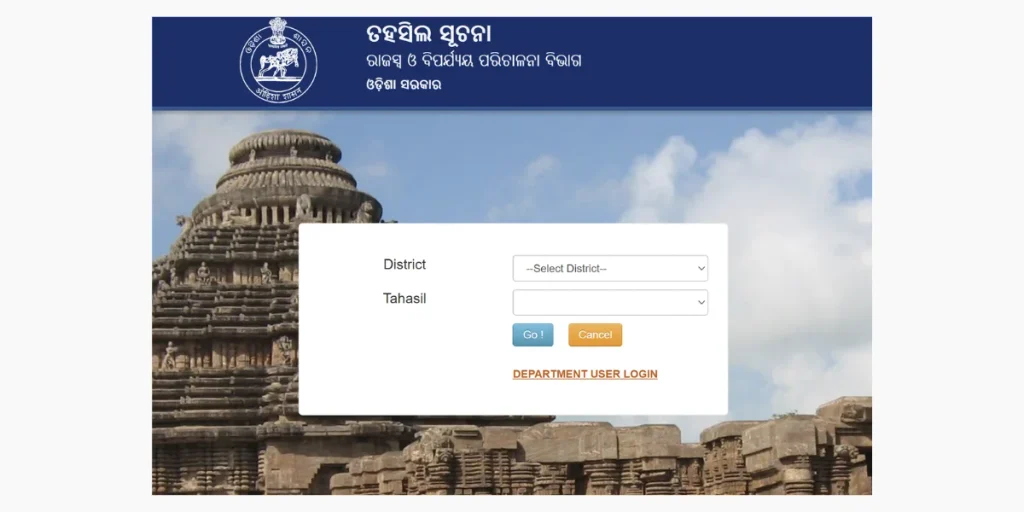
Step 2: On the homepage, look for the “Tahasil Information” option in the navigation section. Click on it to access the related website, https://dwistodisha.nic.in.
Step 3: Select your district and Tahasil from the available dropdown menus.
Step 4: Click the “Go” button to proceed. You will be redirected to the website associated with your selected Tahasil.
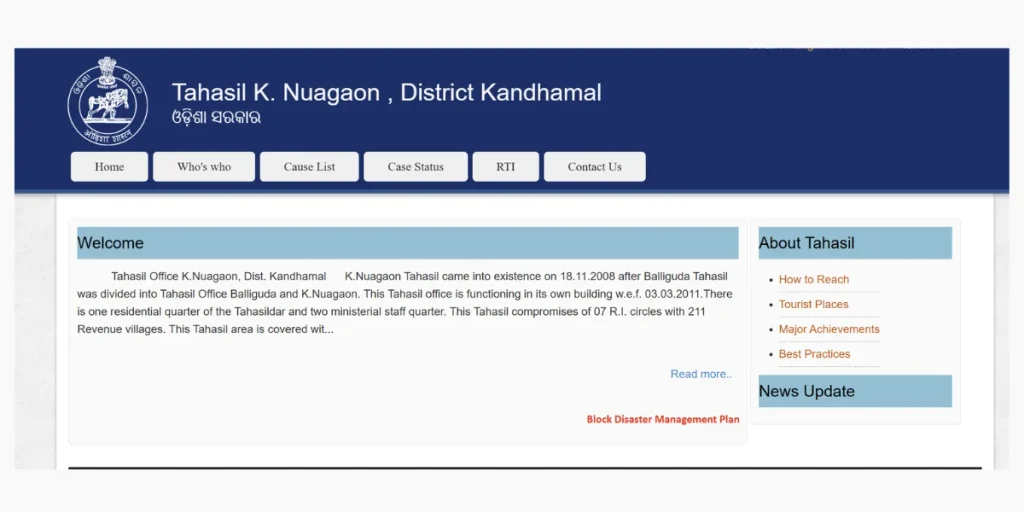
Step 5: Visit the Tahasil-specific website to check the available local revenue and administrative information for that area of Odisha. The details and services provided may vary depending on the selected Tahasil.
Application Fees and Charges for Bhulekh Odisha
The Bhulekh Odisha portal provides access to land records and related services, including the Record of Rights (RoR). Certain fees may apply when requesting an official or certified copy of land records through the applicable service channels.
The following table lists the service charges provided in the available fee details. Please confirm the current rates with the official portal or concerned office before making a payment.
Bhulekh Odisha Service Charges
| Service Description | Charges |
|---|---|
| User cost and government fees | ₹30 |
| Printing charges | ₹10 |
| Certificate output charges | ₹10 |
| Kiosk operator service charges | ₹8 |
| Scanning charges | ₹5 |
| DEGs charges | ₹2 |
| Total listed charges | ₹65 |
Note: The total of ₹65 is calculated by adding the charges listed above. Actual fees may vary depending on the service requested and the applicable government rules.
How to Check Bhu Naksha Odisha on the Bhulekh Odisha Portal?
Bhu Naksha Odisha provides digital cadastral maps that show land plots and their boundaries. These maps help users identify the location of a plot and cross-check its details with the available land records. You can follow the steps below to view the land map online.
Step 1: Visit the official Bhulekh Odisha website and open the homepage.
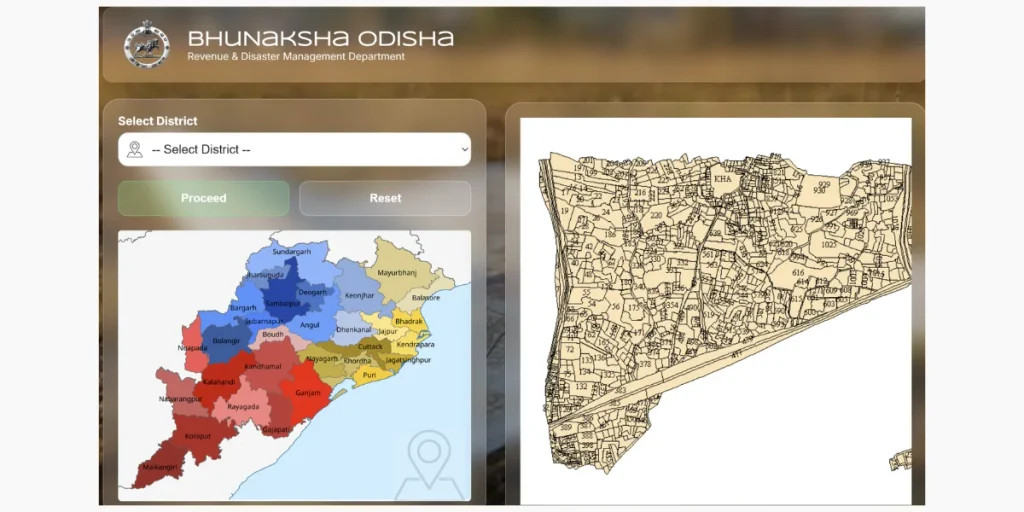
Step 2: Click on the “Map View” option available in the navigation section.
Step 3: After selecting Map View, you will be redirected to the page where the land map service is available.
Step 4: Select the district in which your property is located to proceed to the relevant map interface.
Step 5: Enter or select the required location details, such as the district, Tahasil (tehsil), and village, to find the relevant land map.
Step 6: Locate your plot using its plot number. Select the plot on the displayed map, where available, to view the associated information.
The Bhu Naksha Odisha service helps users examine plot boundaries and compare map details with the corresponding land records. However, for legal verification or property transactions, you should confirm the information with the relevant revenue authorities.
How to Pay Land Revenue on the Bhulekh Odisha Portal?
Apart from accessing land records and Record of Rights (RoR) details, users may be able to pay land revenue online through the relevant Odisha government service. Follow the steps below to complete the payment process.
Step 1: Visit the official Bhulekh Odisha RoR page.
Step 2: Select the required location details, including the district, Tahasil, village, and RI Circle.
Step 3: Click on the “View RoR” button to retrieve the relevant land record.
Step 4: Review the displayed land record and look for the “Pay Land Revenue” option.
Step 5: Click on “Pay Land Revenue” to proceed to the revenue payment section.
Step 6: Under the Demand Details section, review the available information and click on the “Proceed” button.
Step 7: Enter the required depositor details, such as the depositor’s name, relationship with the tenant, address, PIN code, mobile number, and email address.
Step 8: Enter the displayed CAPTCHA code and verify that the information you have provided is correct.
Step 9: Click on the “Make Payment” button to proceed to the payment gateway.
Step 10: Choose one of the payment methods supported by the portal, such as a debit card, credit card, UPI, mobile wallet, RTGS, or NEFT, depending on the options available.
After completing the transaction, save the payment confirmation for future reference. If an online rent receipt is available for your payment, download it and keep a copy for your records.
Note: The available payment methods and steps may change. Follow the instructions displayed on the official Odisha government portal and use the relevant official service to verify your payment status or obtain a rent receipt.
How to Check Pending Case Status on the Odisha Bhulekh Portal
The Odisha Bhulekh portal provides access to land-related services, including links to the Revenue Court Case Monitoring System (RCCMS), where users can check the status of relevant revenue court cases online. Follow the steps below to find the details of a pending case.
Step 1: Visit the official Bhulekh Odisha website at bhulekh.ori.nic.in.
Step 2: Look for the “RCCMS” option and click on it to access the Revenue Court Case Monitoring System. If the link is available, you can also try visiting http://bhulekh.ori.nic.in/rccms.
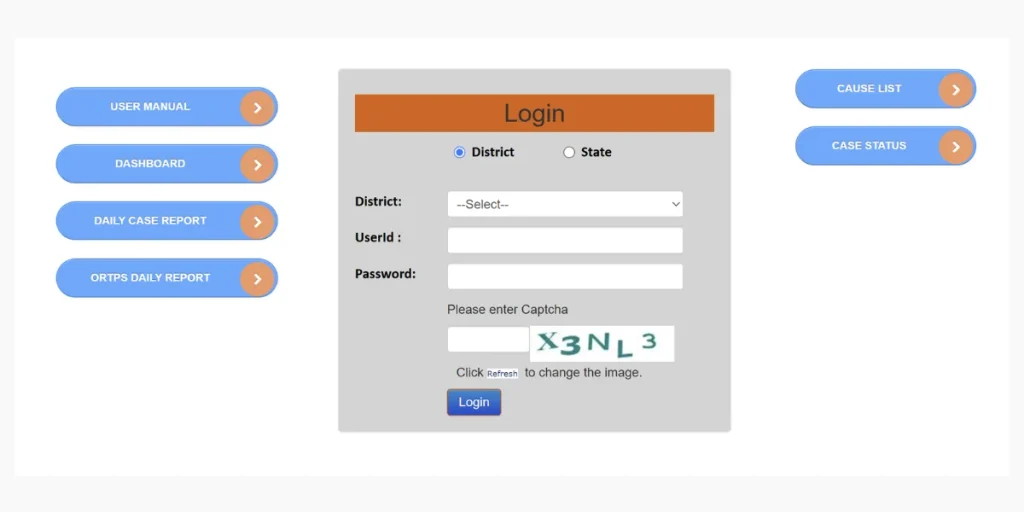
Step 3: On the RCCMS portal, select “Case Status” from the menu on the left-hand side.
Step 4: Enter the required case details in the relevant fields. These may include the court type, case type, case name, and case number, depending on the available search options.
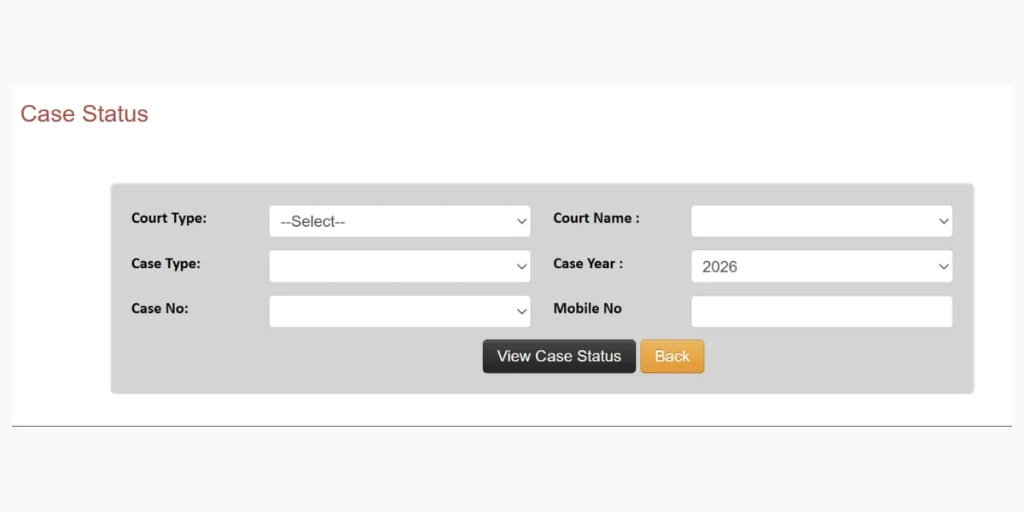
Step 5: Check the information you have entered and click on the “View Status” button.
Step 6: The portal will display the matching case details and its current status, if the information is available.
You can use this facility to check the progress of a pending revenue case without visiting the concerned office in person. If the case details do not appear, verify the information entered or contact the relevant revenue court for assistance.
Documents Required to Obtain RoR on Bhulekh Odisha
To apply for a Record of Rights (RoR) through the Bhulekh Odisha service, applicants may need to provide certain documents to verify their identity and property-related information. The required paperwork can vary depending on the type of application and the service requested.
The commonly required documents may include:
- Property Ownership Documents: Papers that support your claim to the land or property.
- Identity Proof: Documents such as an Aadhaar card, voter ID card, or ration card, as applicable.
- Land Revenue or Tax Payment Receipt: Proof of payment of applicable land revenue or property-related taxes, if required.
- Income Certificate: May be needed for specific applications or related services, depending on the applicable rules.
- Encumbrance Certificate: A document used to check registered transactions or certain liabilities associated with a property, where applicable.
These documents can help officials verify land ownership details and other relevant property information. Before submitting an application, confirm the exact document requirements with the official Odisha Bhulekh portal or the concerned revenue office to avoid unnecessary delays.
Bhulekh Odisha: Online Land Mutation Service
The Odisha government provides online services to help citizens access land records and apply for related revenue services. One important service is land mutation, which refers to updating government land records after a change in ownership due to a sale, inheritance, gift, or property partition.
Why Is Land Mutation Important?
Land mutation helps ensure that the Record of Rights (RoR) reflects the updated ownership details in the revenue records. It is an important step after a property transfer and can help maintain accurate land records for future transactions.
However, mutation alone does not establish legal ownership or replace the underlying ownership documents. Property owners should retain their registered deeds and other relevant legal papers.
Steps to Apply for Land Mutation Online
Applicants can use the relevant Odisha government revenue services portal to check the availability of online mutation services and submit an application where supported.
- Step 1: Registration: Visit the official Odisha Revenue and Disaster Management Department portal and register or log in using the required details.
- Step 2: Enter Details and Upload Documents: Complete the application form with the necessary personal and property information. Upload supporting documents, such as the registered sale deed, patta, inheritance documents, or a No Objection Certificate (NOC), where applicable.
- Step 3: Submit the Application: Pay any applicable fee through the available payment facility and submit the application. Save the acknowledgement or application number for future reference.
- Step 4: Verification: The concerned revenue officials review the application and supporting documents. Additional verification or a field inspection may be required, depending on the case.
- Step 5: Check Application Status: Use the application number or the available tracking facility to check the progress of your mutation request.
The online process can make it easier to submit applications and track their progress. The time required for approval depends on the case, document verification, and applicable revenue procedures.
How to Check Unicode-Converted RoR Data on Bhulekh Odisha?
The Bhulekh Odisha system has provided facilities for handling land records in Unicode format. The departmental data-checking facility, where available, is intended for authorised users to verify converted Record of Rights (RoR) data.
Follow these steps if you have authorised access to the departmental facility:
Step 1: Visit the official Bhulekh Odisha website at bhulekh.ori.nic.in.
Step 2: Look for the “Departmental User Login” option on the homepage.
Step 3: After opening the departmental login section, check whether the “Unicode Data Checking” option is available.
Step 4: Select the relevant district from the available options.
Step 5: Enter your authorised departmental username and password in the designated fields.
Step 6: Click on the “Login” button to access the facility and review the available Unicode-converted RoR data.
Please note that this is a departmental facility and may not be accessible to ordinary citizens. The available options and login process may change as the government updates its systems.
Smart Records of Rights (RoR) in Odisha
Digital land record systems can improve the accessibility and verification of property information. Features such as QR codes, where officially implemented, can also help users check the authenticity of digital documents.
Before relying on claims about a new Smart RoR system, including a specific launch date, blockchain-based security, automatic mutation updates, or mandatory acceptance for home loans, verify the details through official Odisha government announcements.
Potential Benefits of QR-Enabled Land Records
- Quick Verification: A QR code, if provided on an official document, may allow users to access the associated record through an authorised government service.
- Improved Transparency: Digital verification can make it easier to compare document details with information held in government records.
- Reduced Risk of Forgery: Official digital verification can help identify discrepancies between a submitted document and the corresponding government record.
- Easier Record Access: Digitally available land records can reduce the need to rely solely on physical copies.
Important: A QR code or digital copy does not, by itself, guarantee legal ownership. Buyers should independently verify the title documents, encumbrances, mutation status, and relevant revenue records before purchasing land.
Benefits of Bhulekh Odisha
The Bhulekh Odisha portal makes land-related information easier to access and helps citizens review available revenue records. Its main benefits include the following.
- Convenient Access: Users can view available land record details online without necessarily visiting a revenue office for every enquiry.
- Greater Transparency: Online access helps citizens examine recorded land information and identify discrepancies that may require clarification.
- Support in Preventing Fraud: Checking official records can help property buyers identify inconsistencies and reduce the risk of relying on incorrect information.
- Better-Informed Decisions: Access to land records helps property owners and prospective buyers review relevant information before taking further steps.
- Time Savings: Online record searches can reduce paperwork and unnecessary visits for routine enquiries.
- Support for Property Transactions: RoR details can help users conduct preliminary checks before buying, selling, inheriting, or transferring property.
Overall, Bhulekh Odisha is a useful resource for accessing available land records and related services. For legal disputes, ownership verification, or mutation approval, users should consult the relevant revenue authorities and obtain the necessary official documents.
Bhulekh Odisha Contact Details
If you have any questions or concerns regarding Odisha land records, Record of Rights (RoR), or related revenue services, you can contact the concerned Tahasildar or use the contact details listed below for assistance.
| Contact Authority | Contact Details |
|---|---|
| Concerned Tahasildar | Visit dwistodisha.nic.in to access Tahasil-related information. |
| Director, Land Records & Survey, Board of Revenue, Cuttack | Phone: 0671-2509582 |
| Office Hours | 10:00 AM to 5:30 PM on working days |
| Email Support | dilrmp.pmu@gmail.com |
| Revenue Minister Helpline (Toll-Free) | 18001218242 |
| Helpline Operating Hours | Monday to Friday, 10:00 AM to 5:30 PM |
| Revenue Helpline Email | revhelpline-od@gov.in |
Frequently Asked Questions About Bhulekh Odisha
How can I apply for Patta through the Bhulekh Odisha website?
The Bhulekh Odisha portal allows users to view available land records, including RoR details. To check your existing record, select your location and search using the relevant Khatiyan number, plot number, or tenant name. For a new Patta or other ownership-related application, contact the concerned revenue office to confirm the applicable procedure.
What is Patta land in Odisha?
Patta is a land-related document associated with rights over a particular property. The term is commonly used for documents recording land allotment or land rights. The exact legal meaning depends on the type of Patta and the applicable land laws.
Can I pay stamp duty through the Bhulekh Odisha portal?
The Bhulekh Odisha website may provide links to related government services, including stamp duty payment facilities. If a stamp duty link is available, follow it to the designated official payment platform and check the instructions before making a transaction.
Can I obtain Odisha land records using a Khatiyan number?
Yes, you can search for available land records using a Khatiyan number. Visit the official Bhulekh Odisha portal, select the relevant district, Tahasil, village, and RI Circle, and choose the Khatiyan search option. Enter the required details and view the available RoR document.
What is RCCMS on the Bhulekh Odisha portal?
RCCMS stands for Revenue Court Case Monitoring System. It is associated with revenue court services and can help users access available case-related information, such as case status and cause lists. Certain functions may require authorised login credentials.
Are Jamabandi and RoR the same?
Both Jamabandi and Record of Rights (RoR) relate to land and revenue records, but their names, formats, and legal functions can differ between states. In Odisha, users should refer to the official RoR terminology used by the state’s land records system.